




Best Anime Upscaler for Video: 4 Tools to Enhance Anime Videos in 1080P and 4K
Looking for the best anime upscaler for video? Compare 4 tools to enhance anime videos to HD, 4K, or higher with AI, online, open-source, and real-time solutions.
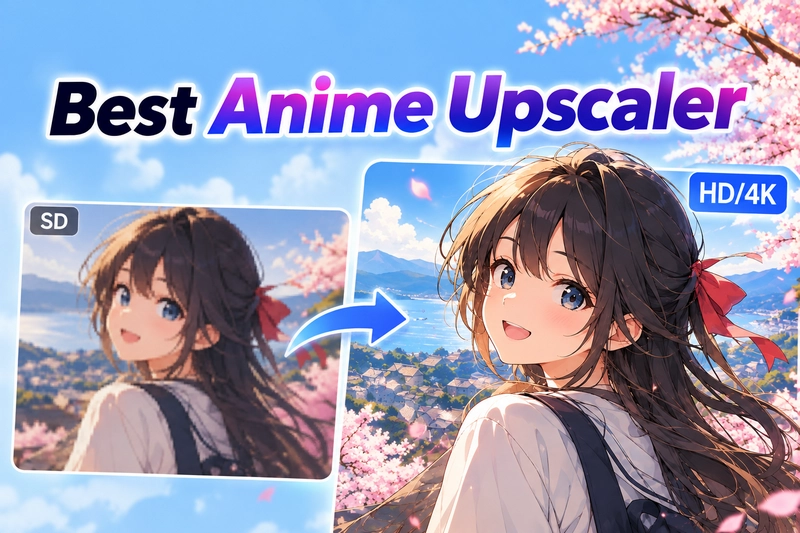
Low-resolution animated videos often appear blurry, especially when played on large screens or high-resolution displays. AI anime upscaler can enhance line clarity, restore picture details, and increase the video resolution to 1080P or 4K. This guide will compare 4 anime video upscalers that adopt different technologies, covering desktop AI enhancement, open-source processing solutions, online upscaling, and real-time playback enhancement.
Quick Comparison: Top 4 Anime Upscalers for Video
| Anime Upscaler | Type | Platform | Max Output | Anime Support | Price | Best For |
|---|---|---|---|---|---|---|
| AVCLabs Video Enhancer AI | Desktop AI anime upscaler | Windows, macOS | Up to 8K | Dedicated Anime model | Paid (Free trial with watermark) | Old anime restoration, AMV/MAD enhancement |
| Video2X | Open-source desktop tool | Windows, Linux; macOS via Docker | 4x upscaling | Real-ESRGAN, Real-CUGAN, Anime4K, etc. | Free | Users who want model and output control |
| Wink | Online video upscaler | Browser | Up to 8K | Dedicated Animation scenario | Freemium (limited credits) | Quick online anime enhancement |
| Anime4K | Real-time shader | Windows, Linux, macOS | Up to 4K display | Real-time GLSL shaders | Free | Real-time playback enhancement |
4 Best Anime Upscaler Video Tools in 2026
We used real anime materials (including 480p classic videos) to test these 4 anime video upscalers, in order to evaluate their performance in terms of line clarity, detail restoration and overall vdeo enhancement.
1. AVCLabs Video Enhancer AI
Website: https://www.avclabs.com/video-enhancer-ai.html
AVCLabs Video Enhancer AI is a desktop AI video upscaler that can upscale low-resolution videos to 1080p, 4K, or even 8K resolution. It offers a dedicated anime model, designed to upscale or clean up old anime and cartoons, while restoring lost details and clarity.
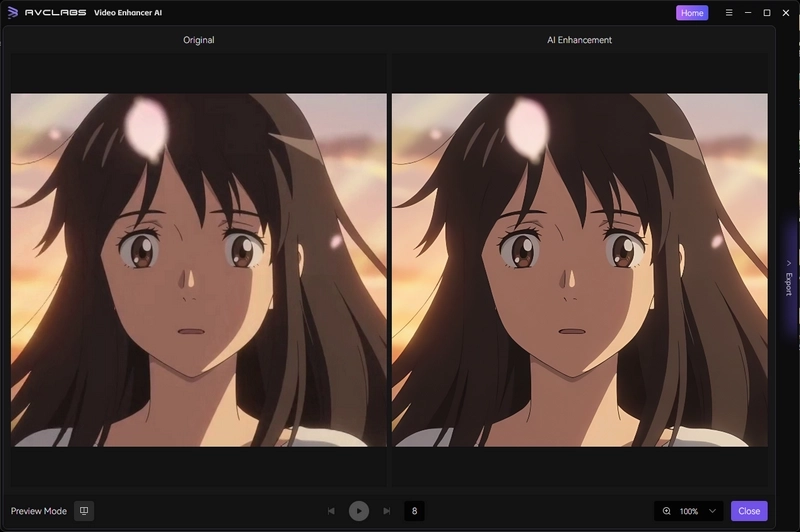
During the test, the output anime video of AVCLabs Video Enhancer AI demonstrated stronger performance in detail enhancement, while maintaining the characteristic soft and refreshing appearance of anime, without introducing excessive messy textures. The edges of the lines were not overly smoothed like those of general models, and the boundaries between color blocks were also kept relatively clean.
Strengths
- Specialized model designed for enhancing anime and cartoon videos.
- Supports additional features like noise reduction and facial enhancement.
- Suitable for old anime restoration and enhancement of AMV/MAD materials.
- Allows users to preview enhancements before exporting.
Weaknesses
- Processing high-resolution videos requires more GPU resources.
- Videos exported with the free trial version contain a watermark.
How to Upscale Anime Videos with AVCLabs Video Enhancer AI?
Step 1: Download and install AVCLabs Video Enhancer AI on your Windows or macOS computer, then launch the program.
Step 2: Import the anime video you wish to enhance and select the "Anime" AI Enhancement model.
Step 3: Select the desired output resolution (such as 1080p or 4K) and adjust other settings as needed.
Step 4: Use the preview feature to compare the original and upscaled anime footage. If you are satisfied with the results, click "Export" to render the enhanced anime video.
2. Viedo2X
Website: https://github.com/k4yt3x/video2x
Video2X is a free, open-source anime video upscaler available on GitHub, supporting a range of anime upscaling engines (including Real-ESRGAN, Real-CUGAN and Anime4K) as well as the RIFE algorithm for frame interpolation. From version 6.0.0 onwards, it features a graphical user interface (GUI), making it easier to use than a command-line-only tool.
For the anime video, we chose the realesr-animevideov3 model of the Real-ESRGAN filter. After video upscaling, the outlines of the anime video became significantly clearer, and the lines became sharper. The overall appearance is closer to the original video, retaining the original softness without adding any unnecessary textures.
🔥 Read More: 10 Best Video Enhancers to Improve Video Quality Free

Strengths
- A completely free, open-source anime upscaler with no watermarks.
- Integrates a variety of AI upscaling models, designed to enhance animation detail and improve line clarity.
- Excels at refining the edges of anime line art without creating a plastic look.
- Provides flexible control over output settings, including CRF, codec, suffix, and more.
Weaknesses
- Unable to preview the effect comparison before and after processing in real time.
- Using this anime upscaling software will cause the computer to frequently freeze.
- Processing speed depends heavily on your GPU and the selected model.
How to Enhance Anime Video Quality with Video2X?
Step 1: Download and install Video2X from the official GitHub Releases page.
Step 2: Run Video2X and click "Add tasks" to add the anime videos you want to restore or enhance.
Step 3: In the pop-up "New Task" window, select the AI anime upscaling model and encoder options.
Step 4: Click the "Start" button to begin enhancing the anime video quality.
3. Wink
Website: https://wink.ai/4k-anime-upscaler
Wink is an online AI video anime upscaler that has optimized processing modes specifically for anime videos. It can upscale video resolution directly in the browser to 1080p, 2K, 4K, or even 8K, without the need to install desktop software or configure local AI models.
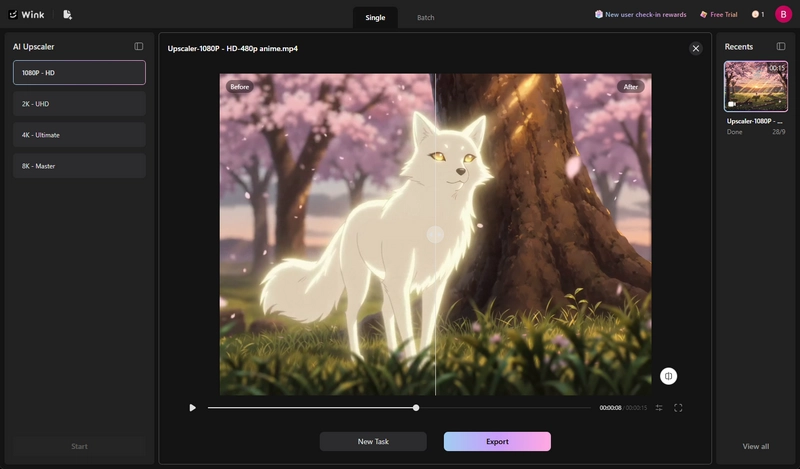
In our test using 480p anime videos, Wink significantly enhanced the clarity of character outlines, facial features, and background textures, while maintaining the overall anime style in a relatively natural manner. The overall processing was towards natural sharpening, without significantly adding excessive textures.
Strengths
- Online anime upscaling without installing desktop software.
- Dedicated Animation scenario for anime content.
- Supports batch upscaling for multiple videos.
- No noticeable oil painting effect or plastic-like appearance.
Weaknesses
- Only the upscaling options are provided, no other parameters.
- You can only see the before-and-after comparison after processing.
- Free credits are limited; additional credits must be purchased.
How to Upscale Anime Videos Online with Wink?
Step 1: Open the Wink online 4K Anime Upscaler.
Step 2: Upload the anime video you want to enhance.
Step 3: Select the target resolution, such as 1080p, 2K, 4K, or 8K.
Step 4: Click "Start" to render the video on the cloud server, then download the enhanced anime video once complete.
4. Anime4K
Website: https://github.com/bloc97/anime4k
Anime4K is a free, open-source solution for real-time anime enhancement, designed to improve playback quality without requiring the generation of new video files. It can run directly in compatible media players, such as mpv and Plex on Windows and Linux platforms, as well as mpv, IINA, and Plex on macOS platforms, allowing users to enjoy the enhanced quality effect while watching the anime.
Anime4K offers a variety of enhancement modes that incorporate different shader processing procedures, such as edge restoration and noise reduction. During playback, users can switch between different Anime4K modes using custom shortcuts in mpv, such as Ctrl+1 or Ctrl+2.

Strengths
- Real-time video quality enhancement with no rendering wait times.
- Includes fast modes optimized for smoother playback on lower-end GPUs.
- Improve the clarity of lines and the sharpness of edges in animation.
- Offers multiple modes tailored to different types of anime sources.
Weaknesses
- Not primarily designed for restoring old anime videos.
- Requires initial setup with a compatible media player (e.g., mpv).
- More advanced enhancement modes require stronger GPU performance for smooth playback.
How to Upscale Anime Videos in Real Time with Anime4K?
Step 1: Download and install a compatible video player on your computer, such as MPV Player (for Windows/Linux/macOS) or IINA (for macOS).
Step 2: Download the latest Anime4K shader ZIP file from GitHub.
Step 3: Extract the ZIP file and move 'input.conf', 'mpv.conf', and the 'shaders' folder into the MPV folder.
Step 4: Open the MPV, play any anime video, and press the shortcut key (for example, Ctrl + 1) to enable the real-time 4K upscaling.
🔥 Read More: Best Free 4K Video Converter: How to Convert Videos to 4K for Free
FAQ About Anime Upscaler
What are some ways to make an old cartoon look sharper (HD)?
Using AI video upscalers can make old cartoon clearer. Tools like AVCLabs Video Enhancer AI and Video2X can reconstruct lines, reduce compression noise, and restore the clarity of color blocks. If only for playback, Anime4K can provide real-time sharpening effects without re-rendering the video.
Can I upscale anime videos for free?
Yes. You can use free tools such as Video2X and Wink to upscale anime videos. You can also try AVCLabs Online Video Upscaler, which uses the same core AI algorithms as its desktop version and provides free credits for testing.
What is the best anime upscaler for video?
Choose the best anime upscaler based on your personal needs. Pick AVCLabs Video Enhancer AI for easy one-click desktop upscaling. Video2X is a free open-source option with more model control. Wink is convenient for online processing, and Anime4K is designed for real-time playback enhancement.
Conclusion
Now, you have mastered 4 excellent options for upscaling anime videos. Each anime upscaler is designed for different usage scenarios. If you are looking for faster speed, simpler operation, or need to restore videos with severely compressed and low-quality video, then you can consider using AVCLabs Video Enhancer AI. As long as you choose the right tool, even old 480p classic anime can regain its clear picture quality.

Upscale low-resolution anime videos to sharper, clearer HD or 4K quality. Preview the enhanced results and restore cleaner lines and details with AI-powered video enhancement.

Billie Miller
Billie Miller is an AI product content strategist who writes about AI-powered tools for image generation, video creation, editing, and creative workflows. She focuses on hands-on testing and real-world use cases, helping readers understand how different AI tools perform in practice and choose the right solution for their creative needs.


 Sherry Johnson
 April 24, 2026