




Is SnapTik Safe? What You Need to Know Before Using It
Is SnapTik safe to use? Learn what SnapTik is, its potential risks, and a reliable alternative for downloading TikTok videos.
If you have ever tried to save a TikTok video without watermarks, then you might have come across SnapTik. SnapTik is a popular tool for downloading TikTok videos without watermarks. Just paste the link and click on the download button, and the TikTok video watermark will be removed. But before clicking the download button, have you ever wondered if SnapTik is really safe?
This article will explore the security of SnapTik and introduces a safer, more reliable desktop alternative that offers the same functionality without any risks.
What is SnapTik?
SnapTik, often referred to as SnapTik Watermark Remover or SnapTik TikTok Downloader, is designed to assist users in downloading TikTok without watermarks. In addition to the online version of the TikTok video downloader, there are also mobile applications for Android and iOS.
Because it is free to use without login, many users rely on it daily to download TikTok videos for offline viewing, archiving, or video editing. You just need to copy the TikTok video link and paste it into the SnapTik website or app. It will then parse the link and provide you with a TikTok video no watermark in MP4 format for your saving.

Is SnapTik Safe? Security and Privacy Risks Explained
SnapTik is not strictly classified as malicious software, but it should not be regarded as a completely risk-free service. Using this third-party TikTok Watermark Remover comes with some security, privacy and performance risks:
1. Privacy and Tracking Risks
Although you can directly download TikTok without watermarks without logging in, using SnapTik is not completely anonymous either. This service may still collect your IP address, browser fingerprint and network data.
2. Unsafe Ads, Pop-Ups, and Redirects
Free online TikTok watermark removers rely on third-party ad networks, including Snapchat. It offers an HD download option when you download TikTok videos no watermarks, , but you need to watch an ad to unlock it. These ads can sometimes lead to pop-ups, redirects, or misleading download buttons.
3. Pirated Apps and Unverified APKs
There are a large number of SnapTik counterfeit websites with similar names on the internet. These unofficial websites may steal personal data, display malicious ads and misleading pop-ups, and redirect users to phishing websites. Moreover, there are also cloned versions of third-party APK files or unofficial app stores on mobile devices.
4. File Integrity Issues
Some SnapTik Watermark Removers may process or recompress TikTok videos before you download them. This can affect video quality or metadata, so the downloaded file may not be exactly the same as the original TikTok content.
Best SnapTik Watermark Remover Alternative: Any Video Converter
If you want to remove TikTok watermark but don't want to bear the privacy and security risks brought by SnapTik, Any Video Converter is a safe and reliable desktop-level alternative. It processes all download tasks locally on your computer - your video links, IP address and browsing data remain private and will never be uploaded to any third-party servers.
Any Video Converter allows you to download video and audio from TikTok and over 1000 other websites. It enables you to choose between three download modes: Best Quality, Balanced, and Compact. You can also use the custom mode to adjust settings such as resolution, frame rate, bit rate, audio quality, and output format.
How to Download TikTok Without Watermark with Any Video Converter?
Step 1: Launch Any Video Converter
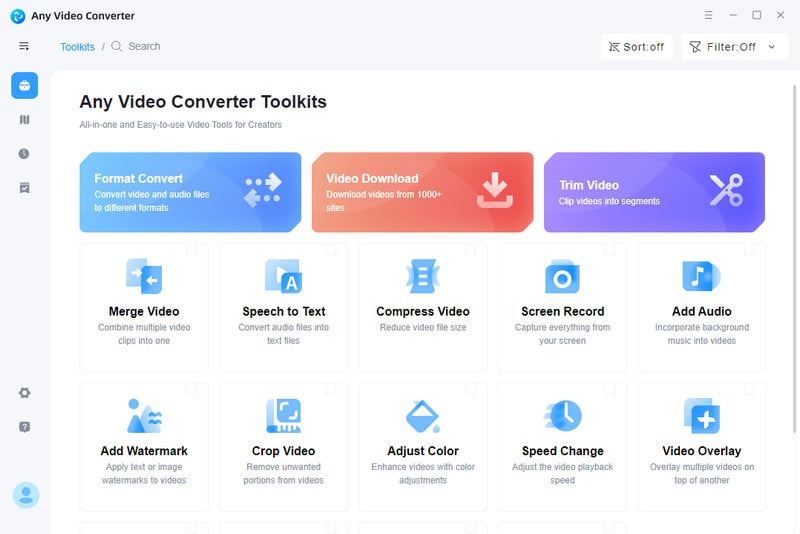
Download and open Any Video Converter. Click the Video Download function on the main interface.
Step 2: Add Video Link
Copy and paste the links of one or more TikTok videos that you want to download into Any Video Converter.
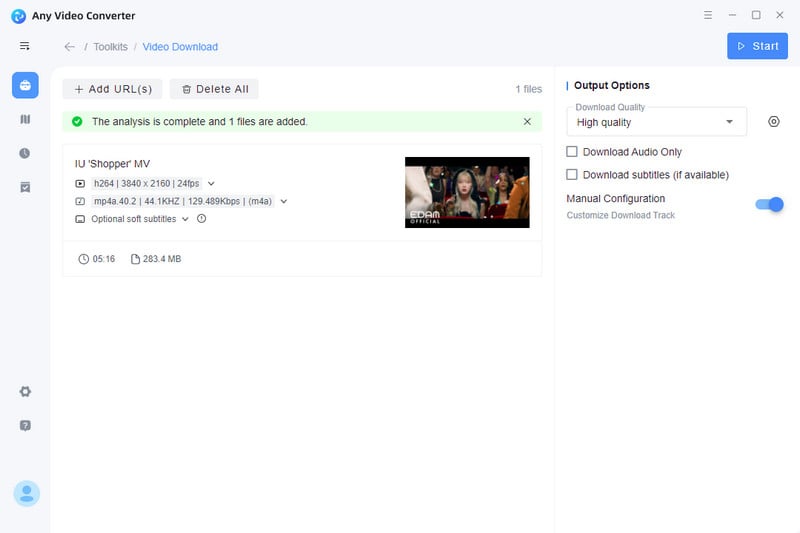
Step 3: Select Output Settings
Select your preferred image quality, format, and other output settings in the right-hand toolbar.
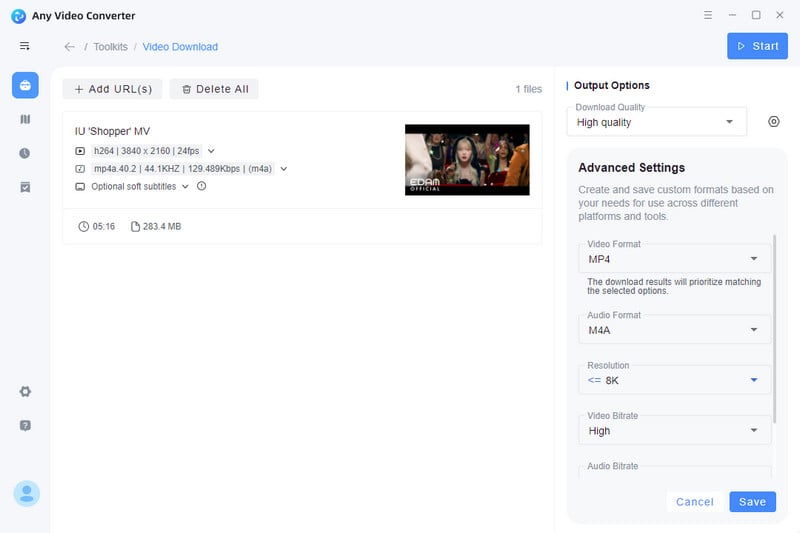
Step 4: Download TikTok No Watermark
Click the "Download Now" button to begin batch downloading TikTok videos without watermarks.

FAQ About SnapTik Watermark Remover
Is SnapTik safe to download?
SnapTik itself is not a malicious software, but its website and third-party APKs may contain advertisements or untrustworthy content. It is recommended to only use trusted domains and avoid downloading applications from unknown sources.
Can SnapTik remove watermarks from TikTok videos?
Yes. SnapTik's core function is to download TikTok videos without watermarks. You simply copy the video link and paste it into SnapTik to get a watermark-free version of the video.
What is the best watermark remover for TikTok videos?
Any Video Converter is one of the best watermark removers for TikTok videos. It can not only batch-save TikTok videos without watermarks while ensuring no pop-up ads, false ads or privacy risks, but also allow you to customize the download settings.
Conclusion
For users who occasionally download TikTok videos, SnapTik can serve as a temporary solution, but it is far from a safe and long-term solution as it has malicious pop-up ads and potential malware redirection. If you place greater emphasis on device security and file quality, then using a dedicated desktop application like Any Video Converter would be a more sensible choice. It offers a 100% secure, stable and fully functional environment, allowing you to easily download, convert and manage TikTok content.

Billie Miller
She has spent years writing about video tools, streaming tech, and digital productivity software. She tests every tool hands-on before recommending it, with a particular focus on finding free and open-source alternatives that actually hold up in real-world use.



 Sherry Johnson
 April 24, 2026