



8 Best AI Video Generators Free No Sign Up in 2026
Tired of signing up and paying? We tried 8 free AI video generators free no sign up in 2026 — most of them instant browser-based generators no account required, and a desktop app that processes everything locally.
Quick Comparison: 8 AI Video Generators Free No Sign Up
| 🎯 Intent | Category | Top Pick | 💡 Quick Verdict |
|---|---|---|---|
| Need Fast, Watermark-Free Output? (Quick Creators) |
No-Signup Browser Tools | ⭐ Upsampler Funy AI |
👍 Pros: No login required; watermark-free output; fast generation; supports text-to-video and image-to-video. 👎 Cons: Limited to 3s (Upsampler) or 6s (Funy AI) on free tier; slow speed on Funy AI. |
| Want the Best Free Online Generator? (Sign-Up Worth It) |
Free Online Tools | ⭐ AVCLabs Online Video Generator | 👍 Pros: Powered by Seedance 2.0; up to 1080p; multiple aspect ratios; integrates with AI image generator; browser-based with no install needed. 👎 Cons: Requires sign-up; free tier has generation limits. |
| Want Full Control with Local Processing? (Desktop Power Users) |
Dedicated Desktop Tools | ⭐ Any Video Converter | 👍 Pros: Runs locally on Windows & Mac; Seedance 2.0 model; up to 15s clips; native audio generation; bundled AI upscaling and speech-to-text; no upload privacy concerns. 👎 Cons: Requires software installation; free AI credits may be limited. |
| Want to Compare Multiple AI Models? (Researchers & Testers) |
Multi-Model Platforms | ⭐ GizAI Pixelbin AI |
👍 Pros: Access to 10-20+ models including Sora 2, Veo 3, Kling, and Hailuo; great for style comparison. 👎 Cons: Downloading requires a paid plan (GizAI); very slow generation and only 3 free uses/month (Pixelbin). |
Best 8 AI Video Generators Free No Sign Up No Limits
1. Upsampler
- Resolution: 480P
- Durations: Only 3s
- Watermark: None
- Models: Wan 2.2 5B Fast, Wan 2.2 14B, LTX 2 Distilled Turbo
- Input: Text-to-Video, Image-to-Video
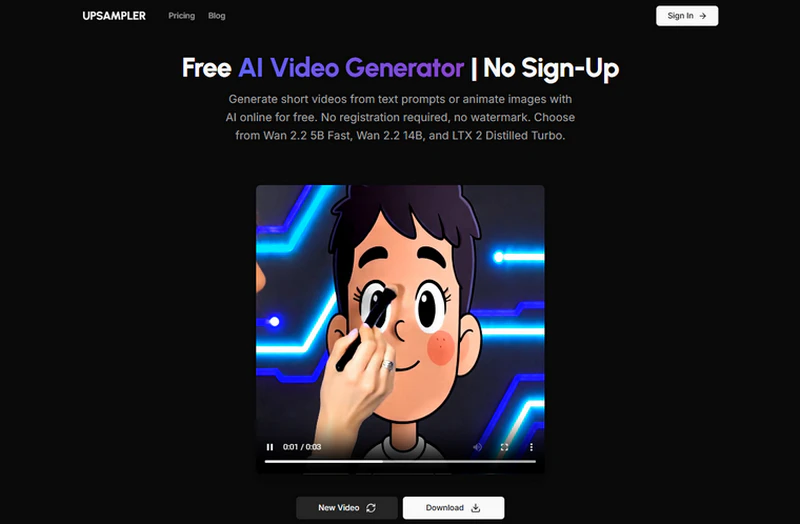
Upsampler is a fully browser-based AI video generator free no sign up that generates watermark-free output. It supports both text-to-video and image-to-video. Generation speed is fast and consistent, delivering 3-second clips every time. Three aspect ratios are available — not many, but enough for most use cases. It offers a limited number of free daily generations.
Once you've used up your 2 free attempts, you'll need to switch to a new device to continue generating. After generating two videos, Upsampler will display a usage limit notice, indicating that your free GPU time has been exhausted. The limit resets 24 hours after your last generation. You can upgrade to the premium plan for more generations and higher output quality.
Pros
- No registration or login required.
- Clean and minimal interface.
- Fast generation speed.
- Offers 3 models: Wan 2.2 5B Fast, Wan 2.2 14B, and LTX 2 Distilled Turbo.
Cons
- Only 3 aspect ratios: 16:9, 9:16, and 1:1.
- Single image upload only.
- Video duration capped at 3 seconds.
My Real Experience
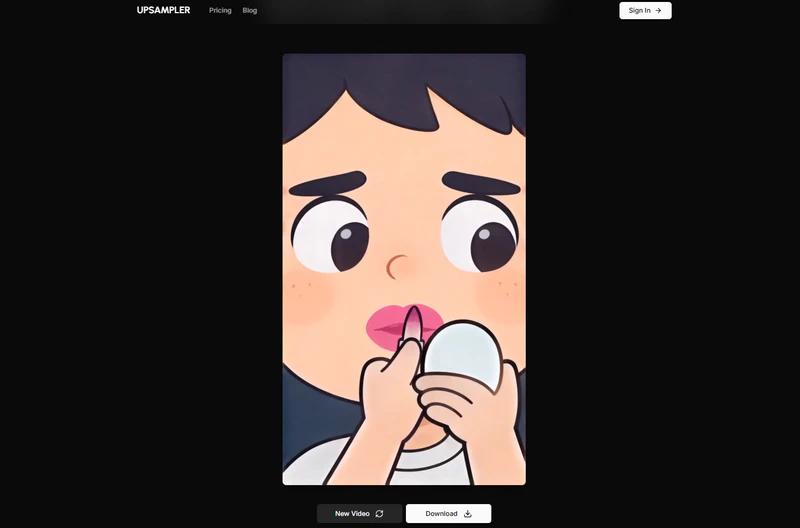
I uploaded a photo and entered the prompt "have him do his own makeup." The two results turned out differently: the first time, with a 1:1 aspect ratio, I got a video with no audio; the second time, switching to 9:16, not only did the video come with audio, but the model also correctly interpreted my intent — the character in the photo was applying makeup to himself, rather than having someone else do it for him. The tool offers only four options: model selection, image upload, prompt input, and aspect ratio.
2. GizAI
- Resolution: 480P / 540P / 720P / 1080P
- Durations: 1s(25fps)- 20s(481fps)
- Watermark: None (preview); download requires paid plan
- Models: LTX-2.3, Sora 2, Seedance Pro, Kling, Hailuo 2.3, PixVerse V6
- Input: Video-to-Video,Text-to-Video, Image-to-Video, First Frame, First and Last Frame
GizAI is an all-in-one AI platform offering a free AI video generator no sign up, including image generation, cloud storage, and basic video enhancement and editing. These are all bundled under a single subscription. Downloading videos, copying text, accessing premium models like Sora 2 and Seedance Pro, and generating longer clips all require a paid plan.
Its output quality is genuinely impressive, and the generation speed is relatively fast. It works best as a versatile sandbox for casual testing. One caveat: it tends to misinterpret simple video prompts, so prompt refinement is recommended for better results. I've added my experience below—feel free to check it out.
Pros
- Wide range of aspect ratios and resolutions.
- Video extension, lip sync, and audio addition.
- 10+ advanced AI models.
Cons
- Interface is more complex.
- Downloading and continued generation require an upgrade ($10/mo).
My Real Experience
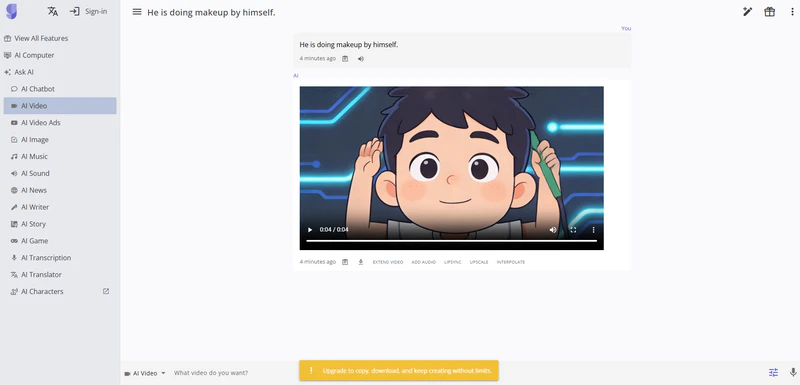
The entire video generation process happens within a single chat interface, so it genuinely feels like working inside an AI agent. GizAI's video generator requires no sign-up, but downloading videos and accessing advanced settings require an upgrade. For my use case, the free tier offers little practical value. On another note, after I entered the prompt "have him apply makeup to himself," the model. For some reason, it generated a clip of the character both applying makeup and lip-syncing the prompt out loud, even though I never enabled other options.
🔥 Guess You Like: 10 Free Online Image Description Generators to Describe Image in 2026
3. Funy AI
- Resolution: 512P / 768P / 1080P
- Durations: 6s / 10s
- Watermark: None
- Commercial Use: Allowed (per site terms)
- Input: Text-to-Video, Image-to-Video, Duo Mode (Left and Right Images)
Funy AI is a free AI video maker no watermark and requires no login at all, it's free to generate 512p, 6-second clips. However, for 10-second clips, higher resolution, or audio, you'll need to sign in and purchase credits. One thing that sets it apart from other tools is the ability to upload two separate images as the left and right areas of the frame. This lets you create videos with automatic side-by-side compositions, or blend them into a shared background.
On the plus side, videos generated by Funy AI are commercially usable, and you can toggle between private and public visibility directly in the settings. It handles simple prompts well and delivers reasonably high-quality output for a free tool. Just expect slightly longer wait times compared to others on this list.
Pros
- 30 free credits for new users.
- Trending short video templates available.
- 30+ premium AI video generation models.
- Generated videos are more detailed and realistic.
Cons
- Generating videos with audio requires an upgrade.
- Free tier is limited to 512p, 6-second clips.
- Generation speed is relatively slow, and speeding it up requires a paid upgrade.
My Real Experience
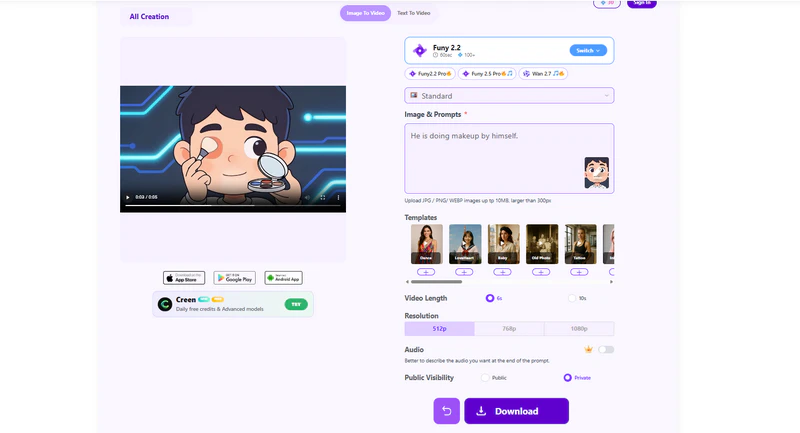
Funy.AI delivered results I was fairly satisfied with. At the very least, it is understood that a character should close their eyes when applying eyeshadow. Generation speed is relatively slow, though still within an acceptable range for a 6-second clip. The tool offers a solid range of models, and the paid audio option is a nice addition.
4. Magic Hour
- Resolution: 512px (free); up to 1080p (paid)
- Durations: 3s (free tier)
- Watermark: Yes (free tier)
- Commercial Use: Paid plans only
- Input: Text-to-Video, Image-to-Video, Video-to-Video, Lip Sync
Magic Hour's image-to-video mode offers no resolution or aspect ratio options and you do not have to sign up. It defaults to the lowest settings. In text-to-video mode, you can choose from 3 basic aspect ratios: 9:16, 16:9, and 1:1. It offers 3 free video generations per day. If you're looking to get more out of the platform, new accounts receive 400 free credits upon sign-up; paid users can skip the queue during peak hours, along with more input modes and resolution options.
Pros
- 3 free video generations per day with watermark.
- Completely free with no registration required.
- 400 free credits for new users upon sign-up.
Cons
- Generating videos longer than 3 seconds is a paid feature.
- Aspect ratio selection is only available in text-to-video mode.
My Real Experience
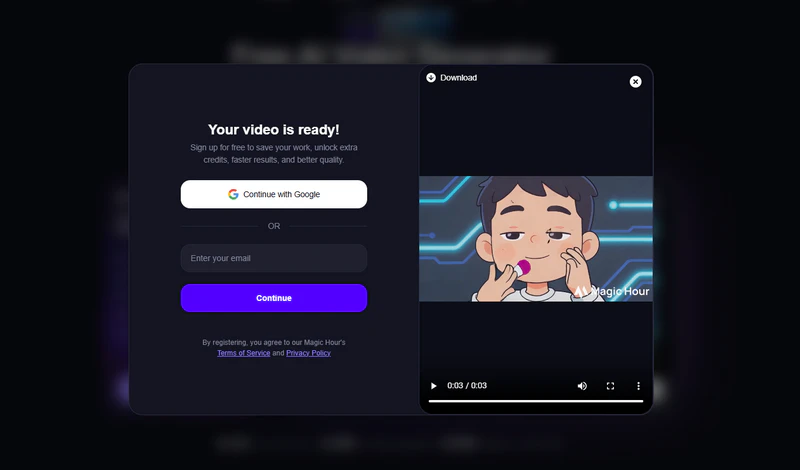
The output quality is decent. Character movement looks natural and never feels jarring. That said, 3 seconds is quite short, making the free no-login version feel somewhat limited in practical use. It works fine if you only need a brief scene, but not much beyond that. On the paid side, Magic Hour offers a broader range of features — if their other tools fit your workflow, it could be a worthwhile investment.
5. Pixelbin AI
- Resolution: Up to 1080p
- Durations: 5s (free)
- Watermark: None
- Free Limit: 3 generations/month
- Models: Veo 3, Kling 2.6, Hailuo 2.3, Seedance, Wan 2.5, LTX-2 Fast
- Input: Text-to-Video, Image-to-Video
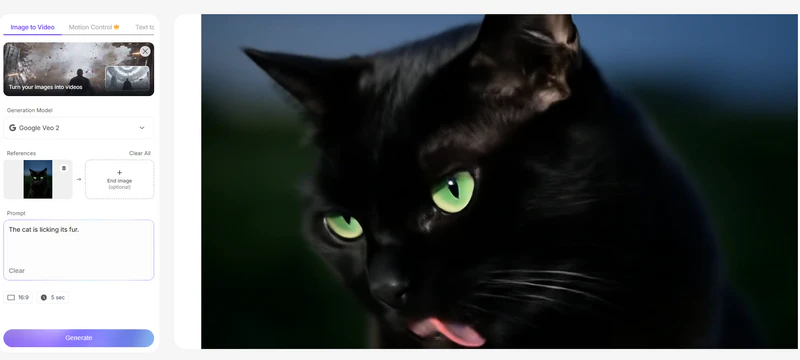
Pixelbin gives access to over 20 AI video generation models in one dashboard—including Google Veo 3, Minimax Hailuo 2.3, Kling 2.6, LTX-2 Fast, Seedance, and Wan 2.5. It makes it ideal for comparing visual styles before committing to a workflow. Also includes motion control (paid), Image generation, Image editing, Video editing.
But the free tier has limitations. If you don't mind the wait and 5 seconds is enough for your needs, especially if output quality is a priority, then Pixelbin is your best bet for a free no-signup AI video generator.
Pros
- 20+ AI video generation models available (paid).
- 3 free video generations per month.
- Fully browser-based — no local GPU required.
Cons
- Only 2 aspect ratios: 16:9 and 9:16.
- Free tier is limited to a single model.
- Generation speed is relatively slow.
🔥 Recommend: Perchance AI Image Generator: Full Review & Best Alternatives
My Real Experience
Using the same cartoon image, the only available free model (Google Veo 2) returned a warning: the input image contains content blocked by your current character/face generation safety settings. I had to switch to an image with no faces to complete the test. The output looks fairly realistic. While the cat's tongue doesn't quite make contact with its fur, the facial expressions and overall movement are well-executed and natural. The processing time was notably long — not ideal if you need quick results.
6. Luna AI
- Resolution: 360P / 540P(free); 720P / 1080P(paid)
- Durations: 5s(free); 8s(paid)
- Watermark: Yes (free), removed on Pro
- Commercial Use: Paid plans only
- Input: Text-to-Video, Image-to-Video
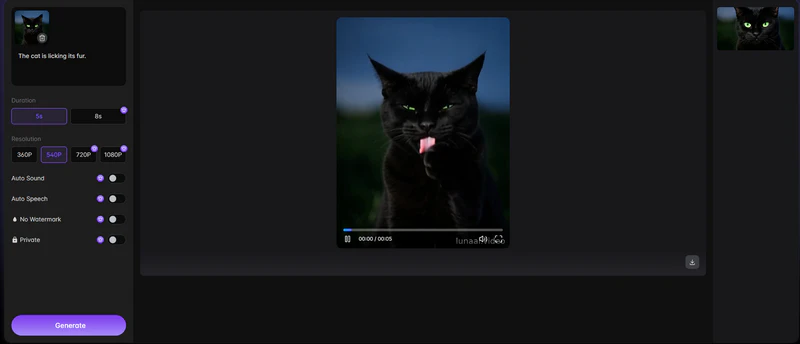
Luna AI video generator is an AI video generator free no sign up. It supports both text-to-video and image-to-video, with no registration required to get started. Its free tier generates 5-second short clips, and output is capped at 540p on the free plan. The generated video would be watermarked, and limited to roughly one clip per day. No audio on the free plan. For clean, watermark-free exports or commercial use, an upgrade is required.
Pros
- No sign-up required.
- Free to generate video online.
- Supports text-to-video and image-to-video.
Cons
- Free output is watermarked and silent.
- No commercial use on the free plan.
My Real Experience
I tried to upload a large image on the first try, and it failed but didn't throw any errors. The output from Luna AI was realistic and natural-looking — though it does come with a small static watermark in the bottom-right corner.
7. Vidful AI
- Resolution: 360p / 540p(free); 720p / 1080p(paid)
- Durations: 5s(free) / 8s
- Watermark: Yes (free tier); removed on paid plans
- Commercial Use: Paid plans only
- Models: Base (free), Google Veo (paid)
- Input: Text-to-Video, Image-to-Video
- Extra: Auto Sound, Auto Speech, Private mode (paid)
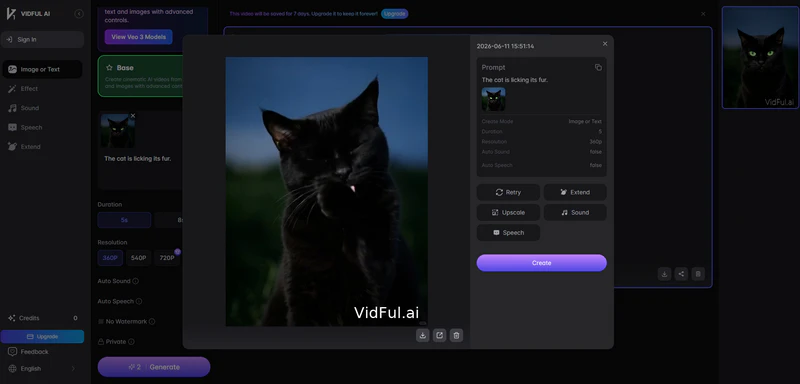
Vidful AI video generator requires no sign-up to use. The interface is polished and responsive — everything felt smooth throughout testing. The free tier comes with around 2 starter credits, enough for one basic test generation. However, free exports carry a watermark, 1080p and Veo 3 access are locked behind a paid plan, and commercial use is not permitted on the free tier. It's best suited for quick experiments and social content rather than production-ready work.
Pros
- No sign-up required.
- Clean, beginner-friendly interface.
- Auto Sound and Auto Speech built in.
- Private mode available.
Cons
- Only 2 free credits.
- Free exports are watermarked.
- 1080p and Veo 3 require a paid plan.
My Real Experience
This cat grooming clip generated by VIDFUL AI looked more natural than the one from Pixelbin AI. The downside, however, is that 1080p is not available on the free tier and the output comes with a watermark — which means an extra step to remove it.
8. Vider
- Resolution: Standard HD
- Watermark: Yes (free); removed on Pro
- Sign-up Required: No
- Commercial Use: Allowed (personal & commercial)
- Input: Image-to-Video (primary), Text-to-Video
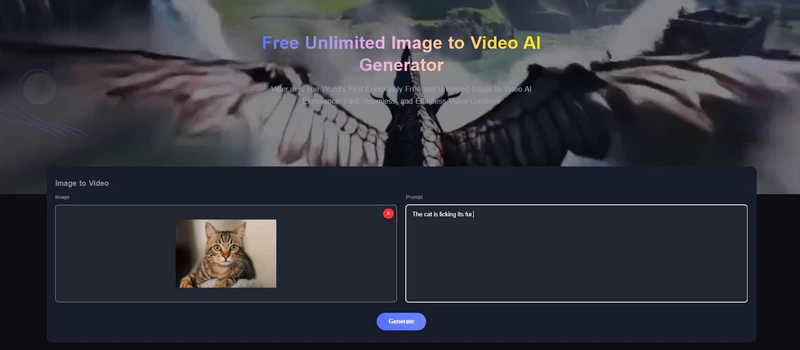
Vider is a truly unlimited free AI video generator with no account required. It's primarily an image-to-video tool, though it also covers text-to-video, image-to-image, and text-to-image in the same dashboard. You upload an image, add a prompt. No settings overload, no credit balance to watch, but you need to wait in a queue. For free users, it would be quite a long time.
Pros
- No sign-up required.
- Commercial use allowed.
- Truly unlimited free generations.
Cons
- Free exports include a watermark.
- Files deleted after 24 hours.
- No audio support.
My Real Experience
After clicking Generate, a Standard Queue panel appears showing your queue position and estimated wait time. Out of all the tools tested, this one has the longest wait times. Honestly, the output quality is genuinely impressive. But given how long the wait is, you're better consider using AVCLabs AI video generator — it runs on Seedance 2.0 and delivers fast, audio-included video generation without the queue.
Free AI Video Generator: Better Results Worth the Sign-Up
💡 Looking for more powerful models? Tools like Kling, Hailuo, Pika, and Sora deliver noticeably stronger output — but all require an account to get started. These tools offer more advanced features and higher quality outputs, but come with the trade-off of requiring user registration.
AVCLabs Online Video Generator — Best Free Online AI Video Generator
- Resolution: 480P / 720P / 1080P
- Durations: 5s / 8s options
- Processing: Browser-based (online, no install)
- Model: Seedance 2.0 Pro, Seedance 2.0 Fast Model
- Input: Text-to-Video, Image-to-Video
- Aspect Ratio: Multiple options (16:9, 9:16, etc.)
- Extra: Integrates with AVCLabs AI Image Generator; adjustable seed value, ...
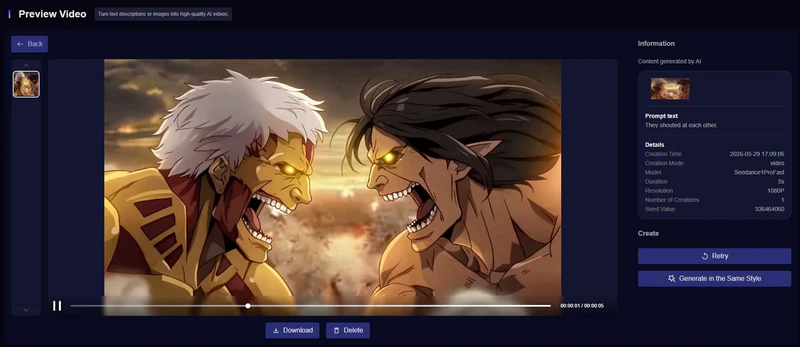
Free turn photos into engaging videos with AVCLabs AI Video Generator from image for social media, marketing, and presentations.
Pros
- Offers 3 free AI video and image generations for new users.
- Supports up to 1080p output with multiple aspect ratios.
- Offers both 5s and 8s duration options.
- Integrates directly with AVCLabs AI Image Generator.
- Allows seed value adjustment for more consistent results.
Cons
- Requires sign-up to access generation features.
- Browser-based only; no offline or local processing support.
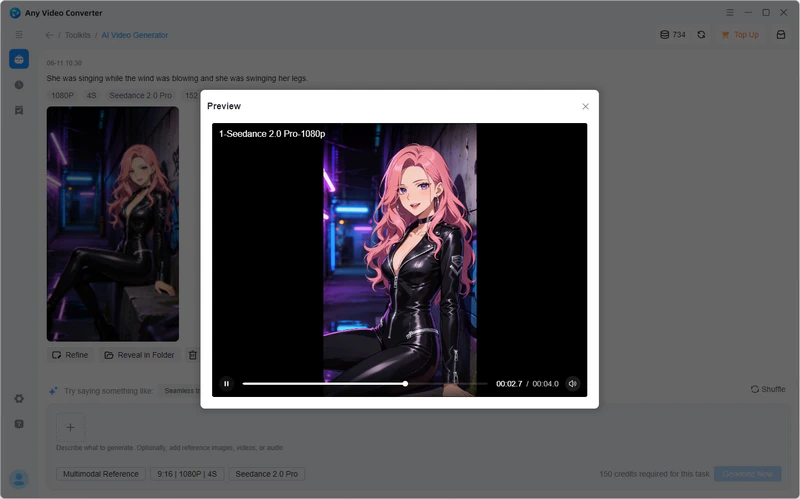
Any Video Converter — Best Desktop AI Video Generator with Local Processing
- Resolution: 480P / 720P / 1080P
- Durations: 4s-15s
- Platform: Windows & Mac
- Model: Seedance 2.0 (via free AI credits)
- Input: Video-to-Video, Text-to-Video, Image-to-Video, First Frame, First and Last Frame
- Aspect Ratio: Multiple options (16:9, 9:16, etc.)
- Extra: Bundled with AI upscaling, speech-to-text, generates videos with native audio, ...
Pros
- Supports the longest clip duration of all tools tested, up to 15s.
- Generates videos with native audio included.
- Runs fully locally — no uploads, no privacy concerns.
- Bundles AI upscaling and speech-to-text at no extra cost.
- Accepts the widest range of input modes: text, image, video, first frame, and first & last frame.
Cons
- Requires software installation on Windows or Mac.
- Free AI credits are limited; heavier use requires a paid plan.
🔥 Recommend: Top 8 AI Image Describers No Filter in 2026
FAQ About AI Video Generator Free No Sign Up
Is there any free AI image to video generator without registration and payment?
Yes. Several tools on this list let you animate a still image into a video clip with zero sign-up and no credit card — including Upsampler, Funy AI, Vider, VideoPlus.ai, and AVCLabs Online Video Generator. Most output 5-8 second MP4 clips at up to 1080p, watermark-free.
What's the current best Image to Video AI Generator?
As of 2026, Kling 2.6, Google Veo 3, and Seedance 2.0 consistently top the benchmarks for image-to-video quality. Seedance 2.0 stands out for its speed and visual consistency — and Any Video Converter has integrated it directly into its desktop app, letting you generate locally without any cloud upload.
Is it safe to use online AI video generators without an account?
Generally yes, but avoid uploading sensitive or personal images since most free tools process data on their servers without a formal data agreement. For maximum privacy, Any Video Converter runs everything locally with no cloud upload.
Are there any free unrestricted AI image/video generators in which I dont need credits?
A few tools on this list are genuinely credit-free, like Vider — generate as much as you want without tracking a credit balance. That said, "unrestricted" is relative; most still cap video duration at 5-8 seconds and may throttle during peak hours.
Can I use AI video generators for free, without sign-up or limits, for NSFW content?
No. Every tool on this list enforces content policies that block NSFW generation, regardless of whether an account is required. No sign-up doesn't mean no rules — requests for explicit content are filtered at the model level and will be rejected. For unrestricted generation, some open-source models like CogVideoX or Wan 2.0 can be run locally, though they require technical setup and capable hardware.
Conclusion
The free tier landscape has improved dramatically in 2026. You don't need a subscription to get started. Pick a tool, run a test, and see what works for your workflow.
For pure output quality with no friction, Pixelbin AI and VideoPlus.ai are our top picks. And if privacy is a concern, Any Video Converter keeps everything local with no cloud upload powered by Seedance 2.0.

Use AI image to video generator no restrictions to create AI videos from text or images — free credits & no watermark.

Billie Miller
Billie covers AI-powered video and image generation tools, with a focus on free and no-signup workflows. She tested all top AI video generator free no sign up hands-on in 2026 to bring you the clearest, most practical comparison possible.


 Sherry Johnson
 April 24, 2026