Best 5 AVI Video Players for Windows in 2026 | Free & Lightweight
 PostedBy: Eve Williams
- Category: Video Enhancer Tips
- Updated On: June 06, 2026
AVI (Audio Video Interleave) is a still widely used video format because of its good quality and straightforward file structure. Many videos uploaded online are still saved in AVI format. If you have AVI files ready for watch and don't want to lose video quality by converting them, while your current player doesn't support AVI properly, this article is for you.
In this guide, we’ll introduce 5 lightweight and free AVI video players for Windows. Each of them is designed for different needs, from ad-free to advanced settings, helping you play AVI videos smoothly on Windows.
Part 1: Top 5 Free and Lightweight AVI Players for Windows
Below is a quick overview of the 5 most notable AVI video players currently available, helping you navigate the one that best fits your needs.
| Player | Platform Support | Lightweight | Subtitles | Ads-Free | Notable Features |
|---|---|---|---|---|---|
| VLC | Win / Mac / Linux / Mobile | Yes | Yes | Yes | Versatile, open-source |
| MPC-HC | Windows | Yes | Yes | Yes | Super light, portable |
| PotPlayer | Windows | Medium | Yes | No | High performance, modern UI |
| KMPlayer | Windows / Android / iOS | Medium | Yes | No | 4K/8K support, stylish |
| GOM Player | Windows / macOS / Android / iOS | Medium | Yes | No | Subtitle sync, codec finder |
1. VLC Media Player
- Website: https://www.videolan.org/vlc/
- Core Features: Extensive format support (MP4, MKV, FLAC, etc.), network stream playback (e.g., YouTube links), DVD and CD playback, advanced subtitle synchronization, command-line interface for automation.
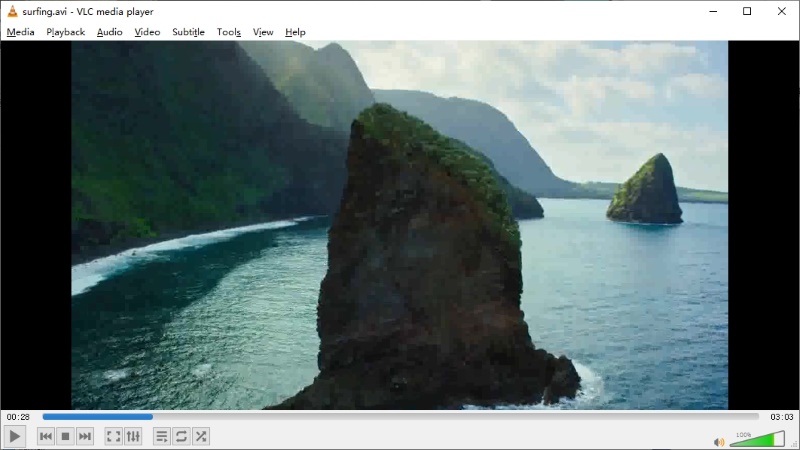
VLC is a free and ad-free, cross-platform multimedia player. It can play most multimedia files, as well as DVDs, audio CDs, VCDs, and various streaming protocols. You do not need to get codes for it to play virtually any type of content, including local files, discs, webcams, external devices, and network streams.
Whether you're streaming from a URL or watching offline videos, VLC rarely disappoints. VLC is also open source, making it a trustworthy choice with a huge community of users and developers constantly improving it.
- Plays almost any video/audio format.
- No interruptions during playback.
- You can rely on a consistent experience across devices.
- May feel unattractive compared to modern players, reducing user enjoyment.
- Potentially confusing for beginners.
- Large or high-bitrate files can stutter.
2. MPC-HC (Media Player Classic – Home Cinema)
- Website: https://mpc-hc.org/
- Core Features: Ultra-lightweight and portable build, high CPU efficiency, customizable hotkeys, minimal UI footprint, DXVA hardware acceleration for legacy devices.
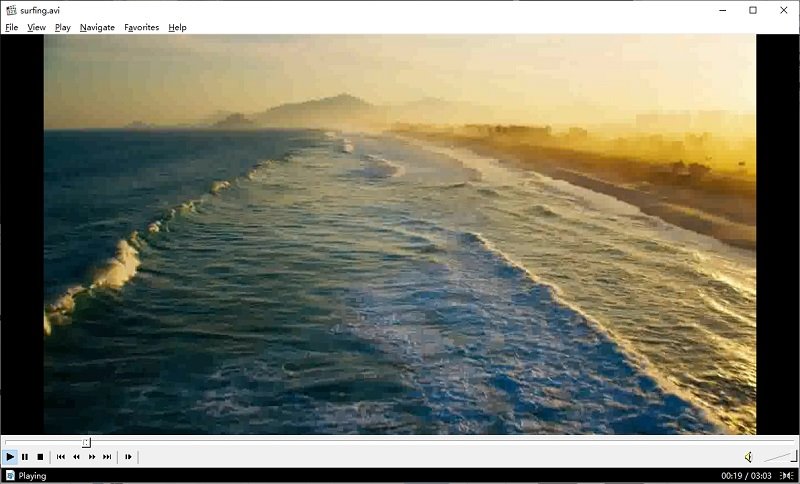
MPC-HC is very popularamong users with older Windows machines, as well as people seeking a super lightweight player. It is known for being incredibly fast and responsive even on laptops with limited RAM and CPU power.
The biggest flaw of MPC-HC is that it is no longer actively developed. However, it is enough if you just want to use it to play AVI videos as MPC-HC still supports a broad range of AVI formats and codecs.
- Uses minimal system resources.
- Instant launch and playback ensure a seamless user experience.
- No installation needed, which is convenient for USB or temporary use.
- Lack of updates could mean future compatibility or security issues.
- Not available for macOS or mobile platforms, limiting device flexibility.
- May be too stripped-down or dated for some users.
3. PotPlayer
- Website: https://potplayer.daum.net/
- Core Features: Customizable video renderer, extensive codec support, advanced filter and shader controls, flexible audio processing, scripting for automation.
PotPlayer is a very capable AVI player that gives you power to control in exchange for ease of use. From a technical standpoint it handles AVI extremely well. It has extensive strong hardware acceleration and smooth playback even for high-bitrate or poorly encoded files.
This also means that the experience can feel overwhelming if you just want to watch a video and move on as the interface exposes a lot of options, menus, and right-click settings. Their presence may adds your mental load. PotPlayer feels more like a workstation compared to other player in the list,.
On the positive side, PotPlayer is generally free of the aggressive ads and pop-ups. It can be extremely satisfying to use especially if you care about fine-tuning playback quality or regularly deal with tricky media files.

- Efficient performance even on mid-range systems.
- Allow advanced users to fine-tune playback, subtitles, and visuals.
- Feature-heavy menus may overwhelm casual users.
- No cross-platform availability, limit use for macOS or Linux.
4. KMPlayer
- Website: https://www.kmplayer.com/
- Core Features: 8K/60FPS ultra-HD playback, gesture control (on mobile), VR mode, URL streaming with download option, integrated cloud playback for Google Drive/Dropbox.
KMPlayer also includes a wide range of built-in codecs. You do not need to add any additional codecs to get smooth avi playback experience. Besides this, KMPlayer also has some useful features. For example you can easily switch subtitles on and off. You can also change the track and control the speed of the video directly. This makes KMPlayer a great choice if you watch different formats of video files beyond AVI regularly.
However, the newer versions of KMPlayer have aggressive ads. When you install KMPlayer it may try to get you to install bundle things. Sometimes KMPlayer will show you pop-ups when it is running in the background, which can feel intrusive. This does not usually make the videos look bad, but it can be frustrating.

- Visually appealing layout.
- Handles 4K and 8K content smoothly.
- Eliminates the need to search and install extra codecs.
- In-app ads can interrupt the viewing experience.
- Users need to avoid unwanted programs during setup.
- May slow down lower-end systems, especially when playing high-res files.
5. GOM Player
- Website: https://www.gomlab.com/
- Core Features: Plays damaged or incomplete AVI files, built-in subtitle library, 360-degree support
GOM Player is a very comfortable choice for playing AVI files if what you care about is a player that feels stable and not mentally tiring. This player is clearly not designed for people who want to adjust every setting manually. You don't have to think about whether you need to change decoding options, or whether the file will behave strangely.
What's even greater is its ability to play damaged or incomplete AVI files, which can be a lifesaver if you have partially corrupted videos.
The free version does include ads, and some more advanced features are locked behind the paid GOM Player Plus version, but these limits are clearly defined and don't constantly interrupt what you're doing.
GOM Player will be a more straightforward and comfortable option than KMPlayer, for users who simply want their AVI files demanding as few decisions as possible

- Helpful when dealing with corrupted AVI files.
- Automatically finds and syncs subtitles, improving accessibility.
- Resolves playback errors quickly by locating and installing missing codecs.
- Banner ads and pop-ups can distract from the main video experience.
- Advanced tools require payment
Part 2: Key Features to Look for in an AVI Player on Windows
If you've gone through the players above but still not sure which one to choose, the summary table below is designed to help.
| Key Feature | Why It Matters |
|---|---|
| Codec Compatibility | Avoid the trouble of installing extra codecs. |
| Lightweight Performance | Minimal CPU and memory use prevents lag, suitable for older or less powerful PCs. |
| Subtitle Support | Supports external subtitle files and syncing for better accessibility and foreign films. |
| Interface Usability | Clean and intuitive UI makes enjoyable experience. |
| Ad-Free Experience | No ads or forced upsells keeping your viewing experience distraction-free. |
Recommended Players by Use Case
-
For Older or Low-Spec PCs: MPC-HC
No fancy UI, just simple and fast playback with low system usage. -
For Smooth, High-Quality Playback: PotPlayer
Supports hardware acceleration and advanced video settings. -
For Subtitle Accuracy and Flexibility: GOM Player or KMPlayer
Both offer subtitle libraries, syncing tools, and strong support for external subtitle files. -
For Simple, Reliable Everyday Use: VLC Media Player
Stable, ad-free, and plays almost any video format out of the box.
FAQ About AVI Video Player
How to Fix Blurry or Pixelated AVI Videos?
AVI is an older video format. Sometimes it can appear blurry or pixelated during playback. This is often because the original video was compressed too much or recorded at a low resolution.
If you want to restore your old AVI videos, consider using AVCLabs Video Enhancer AI. This AI-powered tool automatically cleans up noise, sharpens details, and upscales the resolution to make your videos clearer and more enjoyable.
Key Features of AVCLabs Video Enhancer AI
- Turn low-res boomerang video into stunning 4K quality.
- Easily switch video formats without losing quality or details.
- Customize encoding settings like codec, bitrate, and resolution for each format
- Support batch conversion across various popular video formats.
- Preserve, remove audio tracks during format conversions.

How Can I Improve AVI Playback on Smart TVs and Mobile Devices?
Many smart TVs, iPhones, and Android devices have limited compatibility, especially with older AVI codecs or non-standard encoding.
To ensure smooth playback on these devices, converting AVI files to more widely supported formats like MP4 is recommended.
Conclusion
Whether you need something lightweight like MPC-HC for older machines, or a feature packed player like PotPlayer, we hope you will find an option that fits your workflow from this guide.
If you're working with older or low-quality AVI videos, upgrading your video quality can make a world of difference with AVCLabs Video Enhancer AI.